TrustCloud launches Application Assurance: AI-native continuous control monitoring for enterprises. Read more →

Getting Started

Estimated reading: 7 minutes 4979 views

What is TrustCloud API?

Overview

The TrustCloud API is designed to enable organizations to programmatically interact with their TrustCloud environments. With this API, users can:

  1. Retrieve data about their Governance, Risk, and Compliance (GRC) programs.
  2. Submit compliance evidence to satisfy control requirements.

By leveraging the TrustCloud API, businesses can automate compliance workflows, reducing manual effort and enhancing accuracy and efficiency.

Explore our GRC Launchpad to get expertise on numerous compliance standards and topics.

Setup - TrustCloud API

Getting Started with the TrustCloud API

To begin using the TrustCloud API, you need to generate an API key, authenticate requests, and configure versioning. This guide provides step-by-step instructions.

How do I generate a new API key?

Generating an API Key consists of three steps:

  1. Before You Begin,
  2. Configure API Key, and
  3. Complete Setup.

Here is a step-by-step guide to generating an API key:

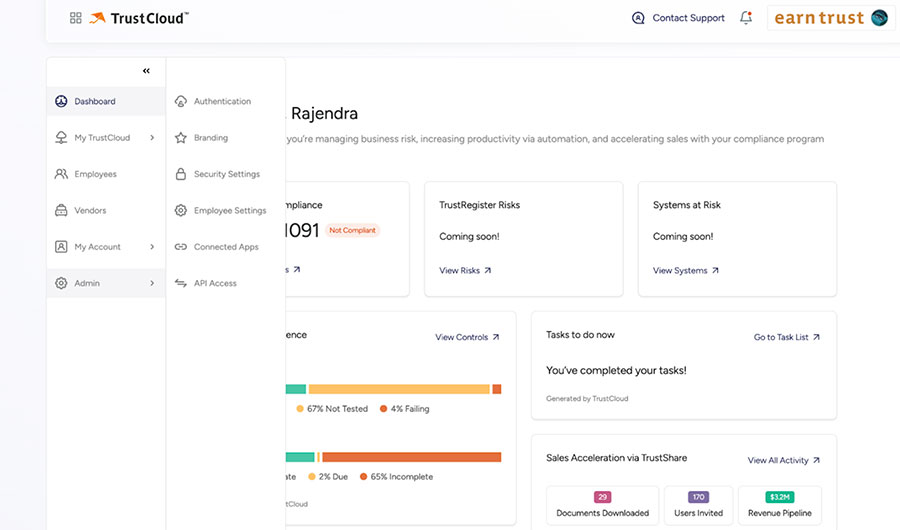
  1. Go to the “Integrations” page from your TrustCloud program.
  2. Select “API Access” from the left-side panel.
    Note: This page is accessible only to the Compliance Admin role.
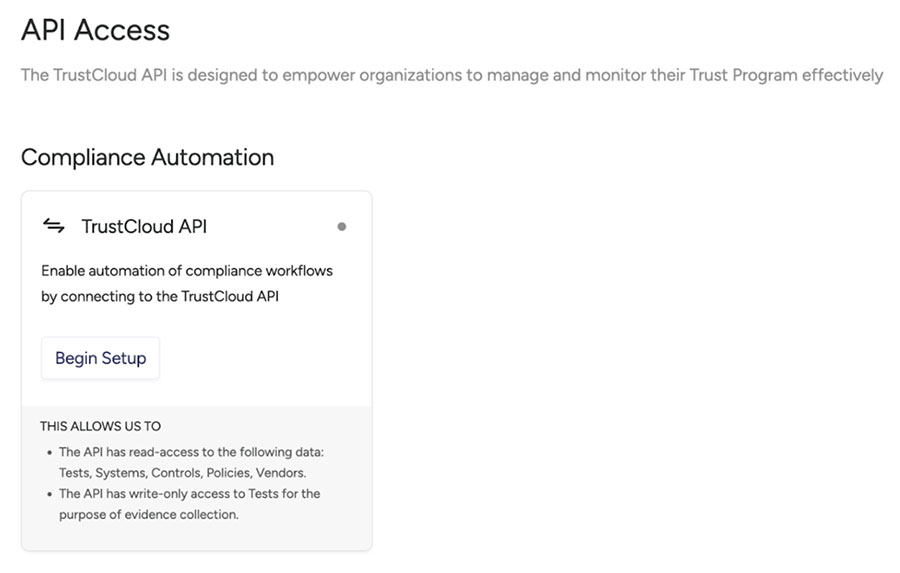
  3. On the “API Access “page, click on the Begin Setup button
    API Access Page
  4. The Before You Begin page is displayed
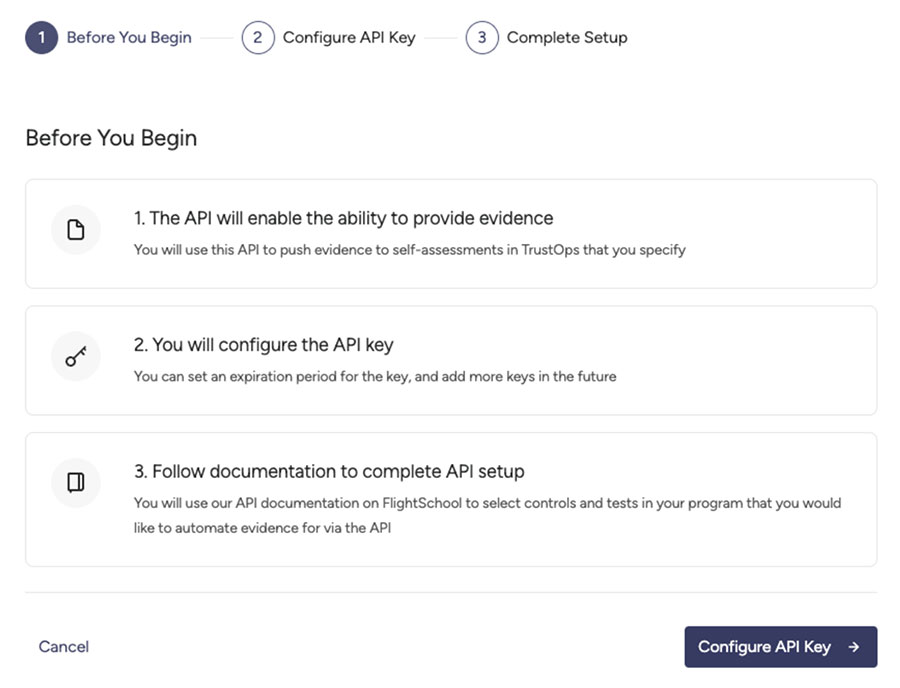
    API Before you begin

Before You Begin

This step states the capabilities of the Trustcloud API and provides documentation to help you complete your API setup.

  1. Click on the “Configure API Key” button.
  2. The Configure API Key page is displayed.
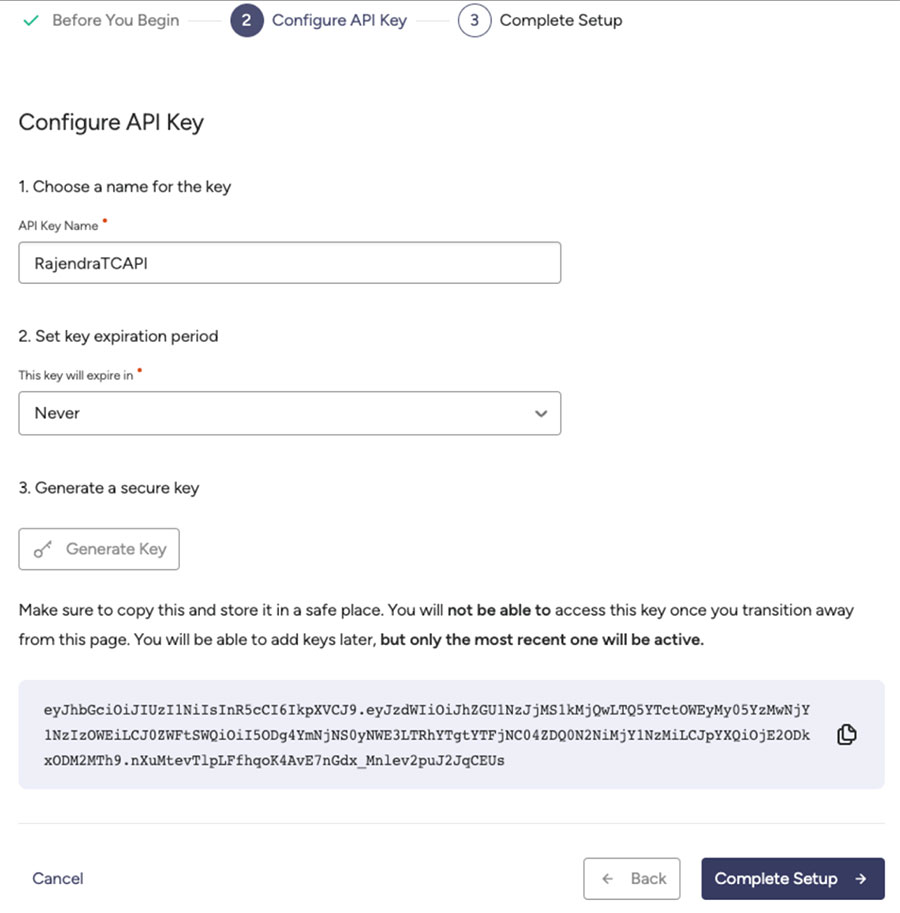
    Configure API key

Configure API Key

This step lets you enter the information related to the API Key.

  1. Enter the API Key Name and set the key expiration period.
  2. Click on the “Generate Key” button.

Please read and follow the instructions displayed on screen.

  1. Copy the API key
  2. Click on the “Complete Setup” button.

Complete Setup

This step lets you set a contact email address to get notifications related to API and related tasks.

  1. Enter the Contact Email to receive notification emails related to the expiration of keys.
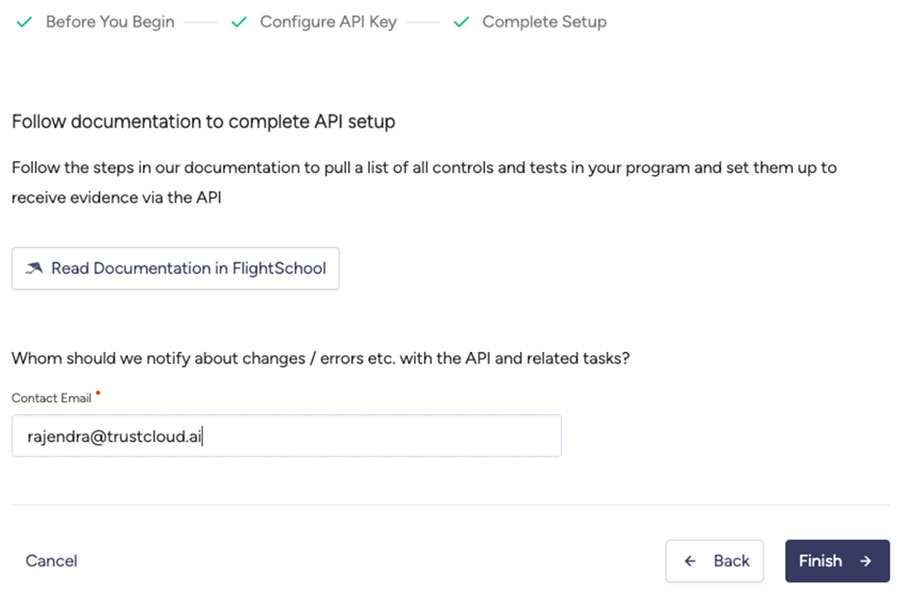
    API Docs - FlightSchool
  2. Click on the “Finish” button, and the API key listing page will be displayed. You can change the Contact information on the Contact Info tab.
  3. You can delete the existing key by clicking on the “Delete” icon next to the key.
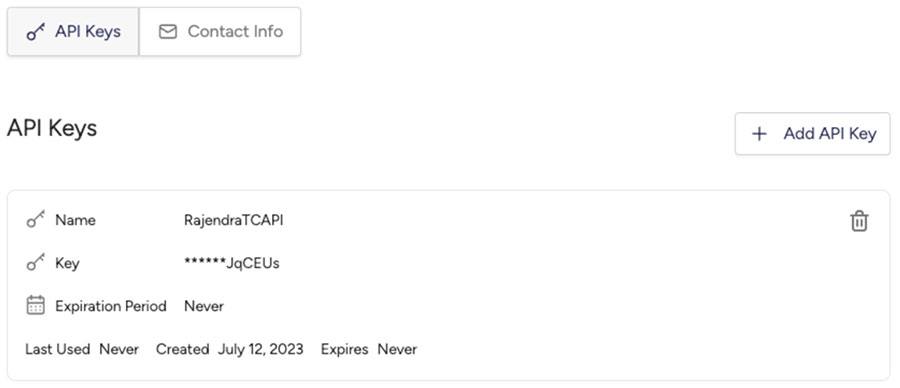
    TrustCloud API keys

Congratulations! You have successfully generated the API Key!

What if the API key is already present?

On the API Access page, as an administrator, you can view the list of API keys on the API Keys tab. You can add a new API key by clicking on the “Add API Key” button. You cannot add an API key that is already present in the list. If you try to add any existing API key name, an error message is displayed, as shown in the following screenshot.
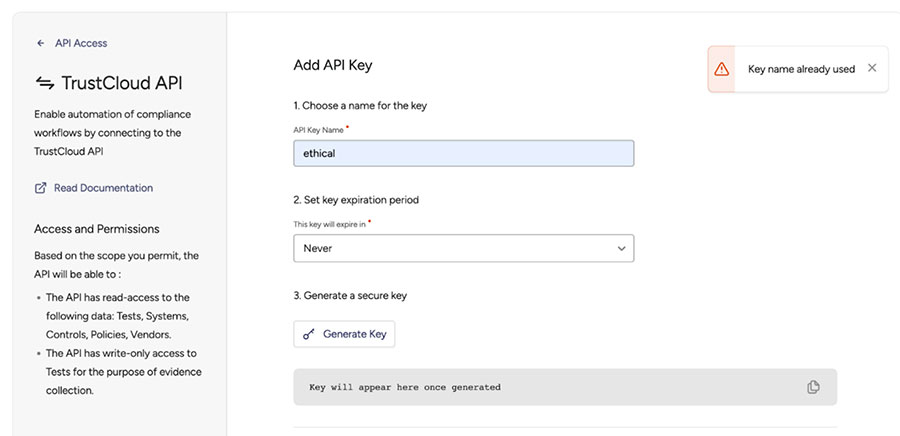
API Key exists

Authenticating Requests

All requests are authenticated with the API key by including it as a Bearer token in the request’s Authorization header. 

Html
				
					Authorization: Bearer <API KEY>


API Versioning

The API is versioned via the x-trustcloud-api-version header, which is required. 

Html
				
					X-trustcloud-api-version 1


Currently, the TrustCloud API is at version 1. 

Writing your first API Request

You can validate your connection to the TrustCloud API by sending a request to retrieve information about your API Key: 

Javascript
				
					const axios = require('axios');

async function getApiKey() {
  const apiKey = '<your_api_key_here>';
  const apiUrl = 'https://api.trustcloud.ai/apikeys/me';

  try {
    const response = await axios.get(apiUrl, {
      headers: {
        'Authorization': `Bearer ${apiKey}`,
        'x-trustcloud-api-version': '1'
      }
    });

    console.log(response.data);
  } catch (error) {
    console.error(error);
  }
}
				
			
Java
				
					import java.io.IOException;
import java.net.http.HttpClient;
import java.net.http.HttpRequest;
import java.net.http.HttpResponse;

public class TrustCloudAPITest {
    public static void main(String[] args) throws IOException, InterruptedException {
        String apiKey = "<your_api_key_here>";
        HttpClient httpClient = HttpClient.newBuilder()
            .version(HttpClient.Version.HTTP_1_1)
            .build();
        HttpRequest request = HttpRequest.newBuilder()
            .GET()
            .uri(java.net.URI.create("https://api.trustcloud.ai/apikeys/me"))
            .setHeader("Authorization", "Bearer " + apiKey)
            .setHeader("x-trustcloud-api-version", "1")
            .build();
        HttpResponse<String> response = httpClient.send(request, HttpResponse.BodyHandlers.ofString());
        System.out.println(response.body());
    }
}
				
			
Csharp
				
					using System;
using System.Net.Http;
using System.Net.Http.Headers;
using System.Threading.Tasks;

namespace TrustCloudAPIExample
{
    class Program
    {
        static async Task Main(string[] args)
        {
            var apiKey = "<your_api_key_here>";
            var httpClient = new HttpClient();
            httpClient.DefaultRequestHeaders.Authorization = new AuthenticationHeaderValue("Bearer", apiKey);
            httpClient.DefaultRequestHeaders.Add("x-trustcloud-api-version", "1");

            var response = await httpClient.GetAsync("https://api.trustcloud.ai/apikeys/me");
            var responseBody = await response.Content.ReadAsStringAsync();

            Console.WriteLine(responseBody);
        }
    }
}
				
			
Python
				
					import requests

def get_api_key():
    api_key = '<your_api_key_here>'
    api_url = 'https://api.trustcloud.ai/apikeys/me'

    headers = {
        'Authorization': f'Bearer {api_key}',
        'x-trustcloud-api-version': '1'
    }

    response = requests.get(api_url, headers=headers)

    print(response.json())

get_api_key()   
				
			
Go
				
					package main

import (
	"fmt"
	"io/ioutil"
	"net/http"
)

func getApiKey() {
	apiKey := "<your_api_key_here>"
	apiUrl := "https://api.trustcloud.ai/apikeys/me"

	req, err := http.NewRequest("GET", apiUrl, nil)
	if err != nil {
		fmt.Println("Error creating HTTP request:", err)
		return
	}

	req.Header.Set("Authorization", fmt.Sprintf("Bearer %s", apiKey))
	req.Header.Set("x-trustcloud-api-version", "1")

	client := &http.Client{}
	resp, err := client.Do(req)
	if err != nil {
		fmt.Println("Error sending HTTP request:", err)
		return
	}

	defer resp.Body.Close()
	body, err := ioutil.ReadAll(resp.Body)
	if err != nil {
		fmt.Println("Error reading response body:", err)
		return
	}

	fmt.Println(string(body))
}
				
			
Bash
				
					GET /apikeys/me HTTP/1.1
Host: API.trustcloud.ai
Authorization: [your_api_key_here]
x-trustcloud-api-version: 1


This will return a payload with your API key details:

Html
				
					HTTP/1.1 200 OK
Content-Type: application/json


{
  "keyName": "[The name of my API Key]",
  "expiresAt": "[Date and time of key expiration"
}


What’s next?

Congratulations, you’ve now connected to TrustCloud API!  To continue, review our guides on Security, Retrieving Trust Objects and Submitting Evidence.  Or, check out our API Guide.

In conclusion, the TrustCloud API is a powerful tool that allows organizations to automate their compliance processes, enhancing efficiency and accuracy. By programmatically retrieving data about their GRC programs and submitting compliance evidence, businesses can streamline their operations and reduce manual labour.

Generating an API key is a straightforward process that involves a few simple steps, providing users with access to the TrustCloud API. With authentication and versioning mechanisms in place, businesses can securely interact with the API and retrieve key information about their API key.

The TrustCloud API opens up possibilities for businesses to improve their compliance management and further explore the capabilities of the API.


API Reference

Join the conversation

You might also be interested in

TrustCloud API

The TrustCloud API is an API designed to empower organizations in managing and monitoring...

Submitting Evidence

This tutorial demonstrates how to retrieve tests that have evidence due, and submit the...

Tests and Evidence

Controls are processes you follow as an organization to prevent a potential risk from...

API Reference

Reference

The list of API references that interact with TrustCloud....

Tutorials

These tutorials demonstrate how to retrieve tests that have evidence due, complete the test,...

Inventories

Controls are processes you follow as an organization to prevent a potential risk from...

Vendors

Controls are processes you follow as an organization to prevent a potential risk from...
OR

TrustCommunity

Instant support with our AI chatbot

Please login with your TrustCloud credentials to continue