Streamlining access control policies: Navigating the remote work and cloud computing landscape
Introduction to access control policies
Access control policies are a crucial aspect of maintaining data security and privacy in any organization. These policies define who can access certain resources, what actions they can perform, and under what conditions. With the rise of remote work and the widespread adoption of cloud computing, organizations are facing new challenges in streamlining access control policies.
In this article, we will explore the impact of remote work and cloud computing on access control policies, discuss the challenges involved, and provide best practices for navigating this evolving landscape.
The impact of remote work on access control policies
Remote work has become the new norm for many organizations, bringing with it a host of benefits such as increased flexibility and productivity. However, it also introduces unique challenges when it comes to access control policies. In a traditional office setting, access control can be enforced through physical security measures such as keycards and biometric authentication. But with employees working from various locations and using different devices, organizations need to rethink their approach to access control.
One of the key challenges is ensuring that only authorized individuals can access sensitive resources. This can be achieved through the use of multi-factor authentication, where users are required to provide multiple pieces of evidence to prove their identity. This can include something they know (e.g., a password), something they have (e.g., a mobile device), or something they are (e.g., a fingerprint).
By implementing multi-factor authentication, organizations can significantly reduce the risk of unauthorized access.
Another challenge is managing access privileges for remote employees. In a traditional office setting, access privileges are often based on job roles and responsibilities. However, in a remote work environment, roles and responsibilities may be more fluid, and access privileges need to be adjusted accordingly.
Organizations can address this challenge by implementing a role-based access control (RBAC) system, where access privileges are assigned based on predefined roles. This allows organizations to easily manage access rights for remote employees and ensure that they have the appropriate level of access to perform their duties.
The role of cloud computing in access control policies
Cloud computing has revolutionized the way organizations store, manage, and access their data. With the cloud, employees can access data and applications from anywhere, at any time, using any device with an internet connection. While this brings immense convenience and flexibility, it also introduces new security considerations when it comes to access control.
One of the key advantages of cloud computing is the ability to centralize access control policies. Instead of managing access control on individual devices or servers, organizations can implement access control policies at the cloud level. This allows for consistent enforcement of access control across all devices and applications, regardless of location. It also enables organizations to quickly update access control policies and respond to emerging threats.
However, the cloud also presents challenges when it comes to data privacy and compliance. Organizations need to ensure that their access control policies align with data protection regulations, such as the General Data Protection Regulation (GDPR) or the California Consumer Privacy Act (CCPA).
They must also consider the security measures implemented by their cloud service providers and ensure that these align with their own access control policies. Regular audits and assessments can help organizations identify any gaps or weaknesses in their access control policies and take appropriate measures to address them.
Challenges in streamlining access control policies for remote work and cloud computing
Streamlining access control policies for remote work and cloud computing comes with its own set of challenges. One of the main challenges is striking the right balance between security and usability. While it is crucial to implement strong access control measures, organizations need to ensure that these measures do not hinder productivity or create unnecessary barriers for employees.
Another challenge is the complexity of managing access control policies across multiple platforms and applications. With employees using a wide range of devices and applications to perform their work, organizations need to have a centralized system in place to manage access control policies effectively.
This can include the use of identity and access management (IAM) solutions that integrate with various platforms and provide a single interface for managing access rights.
Additionally, organizations need to consider the human factor in access control. Employees may inadvertently compromise security through actions such as sharing passwords or falling victim to phishing attacks.
Therefore, it is essential to provide regular training and awareness programs to educate employees about best practices for access control and cybersecurity.
Best practices for navigating the remote work and cloud computing landscape
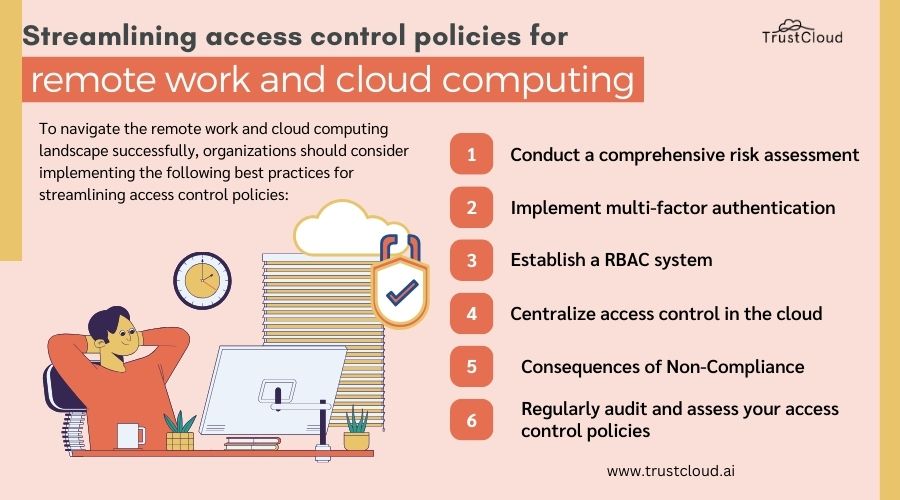
To navigate the remote work and cloud computing landscape successfully, organizations should consider implementing the following best practices for streamlining access control policies:
- Conduct a comprehensive risk assessment: Identify potential vulnerabilities and threats to your access control policies and develop mitigation strategies to address them.
- Implement multi-factor authentication: Require users to provide multiple pieces of evidence to prove their identity, reducing the risk of unauthorized access.
- Establish a role-based access control (RBAC) system: Define roles and responsibilities within your organization and assign access privileges based on these roles. Regularly review and update access privileges as needed.
- Centralize access control in the cloud: Implement access control policies at the cloud level to ensure consistent enforcement across all devices and applications.
- Regularly audit and assess your access control policies: Conduct regular assessments to identify any gaps or weaknesses in your access control policies and take appropriate measures to address them.
Tools and technologies for streamlining access control policies
Several tools and technologies can help organizations streamline their access control policies in the remote work and cloud computing landscape. These include:
- Identity and Access Management (IAM) solutions: IAM solutions provide a centralized platform for managing access rights and enforcing access control policies across multiple platforms and applications.
- Single Sign-On (SSO) solutions: SSO solutions allow users to authenticate once and gain access to multiple applications and resources, reducing the need for multiple login credentials.
- Privileged Access Management (PAM) solutions: PAM solutions help organizations manage and monitor privileged accounts, which often have elevated access privileges and pose a higher security risk.
- Security Information and Event Management (SIEM) solutions: SIEM solutions collect and analyze security event data from various sources, helping organizations detect and respond to security incidents in real-time.
Case studies: Successful implementation of access control policies in remote work and cloud computing environments
Several organizations have successfully implemented access control policies in remote work and cloud computing environments. For example, Company X implemented a role-based access control system, where access privileges were assigned based on job roles and responsibilities.
This allowed the organization to easily manage access rights for remote employees and ensure that they had the appropriate level of access to perform their duties.
Another case study is Company Y, which implemented multi-factor authentication across all its remote work devices and applications. By requiring employees to provide multiple pieces of evidence to prove their identity, the organization significantly reduced the risk of unauthorized access to sensitive resources.
The future of access control policies in the remote work and cloud computing landscape
As remote work and cloud computing continue to evolve, access control policies will need to adapt accordingly. The future of access control policies lies in technologies such as biometric authentication, which can provide a higher level of security and convenience.
We can also expect to see advancements in artificial intelligence and machine learning, which can help organizations detect and respond to emerging threats in real-time.
Conclusion
Streamlining access control policies in the remote work and cloud computing landscape is crucial for maintaining data security and privacy. By understanding the impact of remote work and cloud computing, addressing the challenges involved, and implementing best practices, organizations can navigate this evolving landscape successfully.
With the right tools and technologies, along with a proactive approach to security, organizations can ensure that their access control policies remain effective in the face of emerging threats.
Sign up with TrustCloud to learn more about how you can upgrade GRC into a profit center by automating your organization’s governance, risk management, and compliance (GRC) processes.
Explore our GRC launchpad to gain expertise on numerous GRC topics and compliance standards.